

How Do Smart Downlights Work? A Practical Guide
Smart Downlights Work through a matched set of parts: the fixture receives power, its LED driver regulates power for the LED source, and a compatible control module receives a command. That command can change on/off status, brightness, colour temperature, or another function documented for the selected configuration.
The key word is matched. A downlight, driver, dimmer or controller, and control method need approval as one configuration.
What Are Smart Downlights?
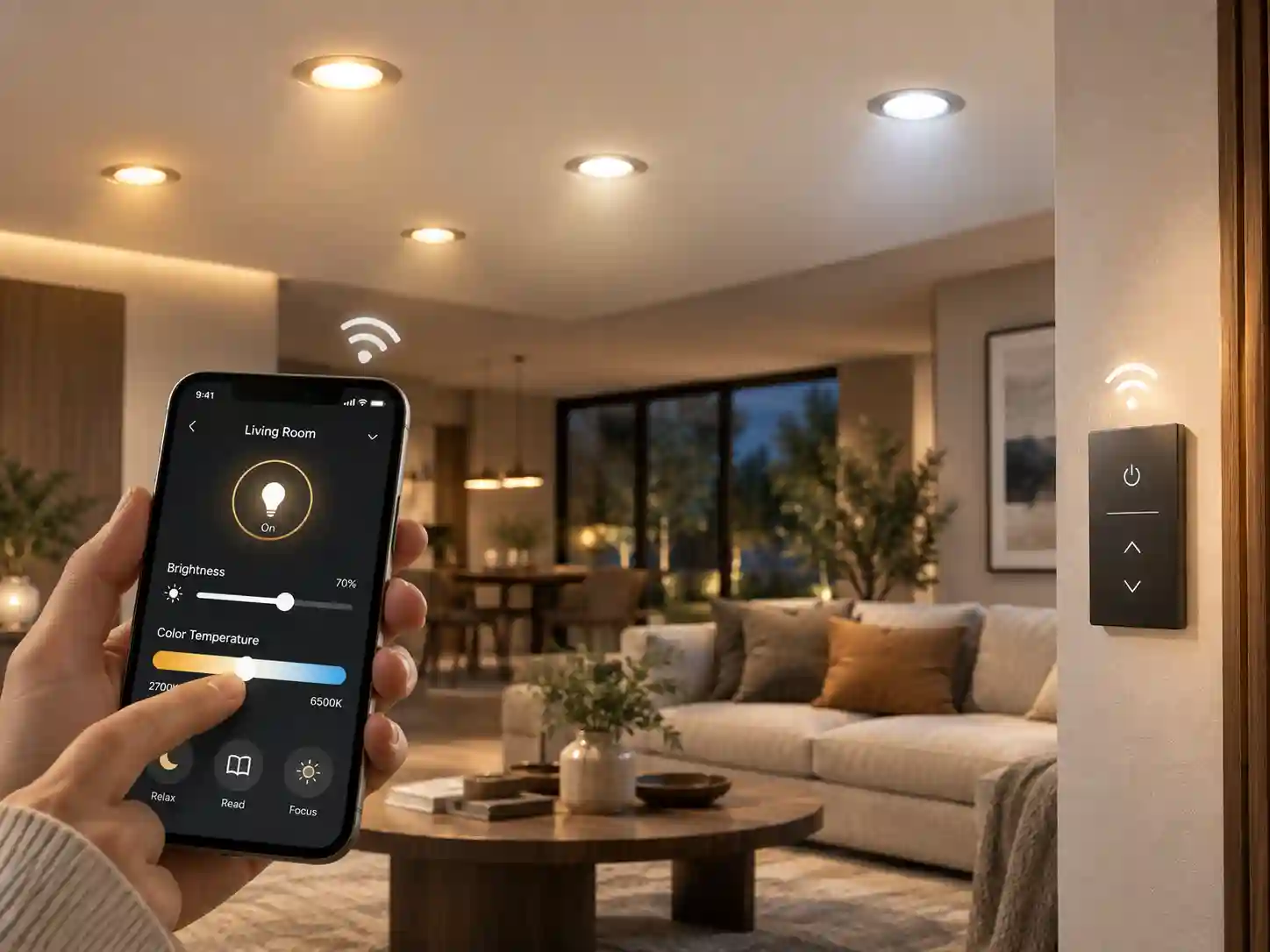
Smart downlights are LED downlights with an added control path. The path may use a mobile app, a wireless control device, a wall or panel control, or a wired building-control system. The available function follows the fixture and driver specification.
A standard LED downlight still uses an LED source and driver. A smart version adds the electronics or compatible controller needed to receive and act on a control instruction. The ceiling opening and visible trim do not identify that capability. Product model and driver information do.
How Do Smart Downlights Work Internally?
The mains supply reaches the downlight or its separate driver according to the selected electrical design. The driver regulates electrical power for the LED module. This part matters because driver choice affects dimming and smart-control compatibility.
The control module receives an instruction from an approved app, remote, panel, dimmer, gateway, or wired controller. It passes the relevant control signal to the driver or fixture electronics. The LED module responds within the functions available for that configuration.
Optics shape the emitted light, while the fixture body and installation conditions affect the physical installation. Smart control does not replace the need to review the model’s cut-out, driver position, wiring method, rating, and installation instructions. The same model code should appear on the fixture schedule, control schedule, and order record.
Which Control Methods Can Smart Downlights Use?
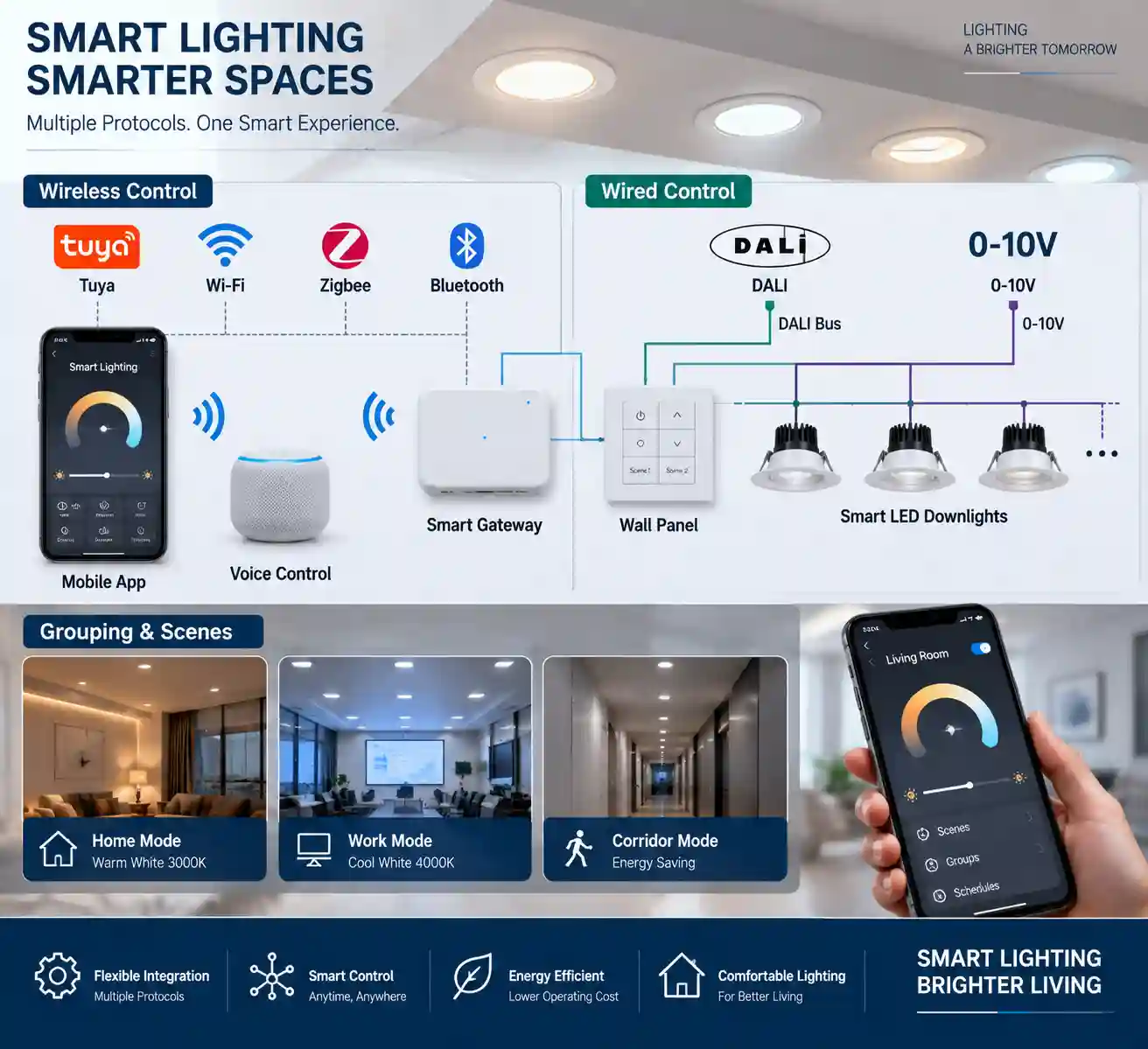
Applicable Sampo product materials refer to Tuya, Wi-Fi, Bluetooth, Zigbee, DALI, 0-10 V, 1-10 V, RF, infrared, and panel controls. Each listed method requires model-level confirmation for the relevant downlight configuration.
|
Control Method |
How the Command Reaches the Lighting System |
What You Need to Confirm |
|
Wi-Fi or Tuya app control |
A compatible fixture or controller receives app-based commands through the supported network arrangement. |
Exact app or platform, driver, network arrangement, and model support. |
|
Bluetooth, Zigbee, RF, or infrared |
A compatible wireless device sends commands to the fixture or controller. |
Required controller or gateway, range, pairing method, and configuration. |
|
DALI, 0-10 V, or 1-10 V |
A wired control signal connects the selected driver and building control system. |
Driver interface, wiring arrangement, control device, and commissioning information. |
|
Wall or panel control |
A compatible wall or panel control sends the selected command. |
Control type, wiring, driver compatibility, and function assignment. |
Wi-Fi can support app-led control for selected products. Bluetooth, Zigbee, RF, and infrared use different equipment and setup requirements. Record the chosen method before the fixture schedule is finalised.
Wired protocols need the same discipline. DALI is a digital lighting-control interface, while 0-10 V and 1-10 V use control-signal ranges. The driver and controller must support the same method. A normal wall dimmer requires its own compatibility check.
Review LED lighting products alongside the downlight specification. The quotation needs the final model and configuration.
What Can Smart Downlights Control?
Smart functions need to be identified feature by feature. A command can only change a function that the fixture, driver, and controller have been specified to handle.
|
Function |
What It Changes |
Confirmation Needed |
|
On and off control |
Fixture operating state |
Control device and switching arrangement |
|
Dimming |
Light level |
Downlight, driver, and dimmer or controller compatibility |
|
CCT adjustment |
Selected colour temperature |
Tunable fixture specification and control configuration |
|
Group or scene control |
Operation of defined fixtures together |
Grouping method, controller, and commissioning arrangement |
|
App or voice control |
Command source and user interface |
Supported platform, gateway requirements, and selected model |
Group and scene control require the project to define which fittings belong together. Put the intended zones on the lighting and control drawings before ordering.
How Do Smart Downlights Connect to a Smart Home System?
Some supported configurations connect directly through an app-based arrangement. Others use a hub or gateway that links selected control devices and the lighting system. Wired building controls use their specified wiring and commissioning process.
The platform name alone does not confirm interoperability. Request the product’s control documentation and check the fixture, driver, controller, gateway, and desired app or smart-home platform as one package. Similar-looking devices are not compatibility evidence.
For residential planning, LED lights for home projects can help place general, task, and accent lighting before controls are assigned. The final downlight selection still requires its own model-level check.
Do Smart Downlights Work Without Internet?
The answer depends on the selected control method. A local wall or panel control, RF control, infrared control, or a specified wired control arrangement can operate according to its documented configuration. App, cloud, gateway, and voice functions require confirmation of their setup and operating conditions.
State the required local-control behaviour in the RFQ. This avoids an assumption that a phone app, gateway, or internet connection will provide every day-to-day control function.
How Should Buyers Check Smart Downlight Compatibility?
Start with the electrical architecture. Identify the building supply, downlight input requirement, driver model or position, and control method. Then verify the ceiling opening, depth, access to any separate driver, and the product’s specified requirements.
Keep the driver, fixture, controller, and control protocol on one model-level schedule. Driver substitution can change the dimming or smart-control result. The same applies when a contractor changes a wall control during installation.
The schedule should also identify the intended functions: switching, dimming, CCT adjustment, grouping, scenes, app access, wireless scenes, or voice control. An item that is not stated cannot be assumed at commissioning.
Smart Downlight Buying Checklist
- Exact downlight model, quantity, and installation method.
- Building supply and fixture or driver electrical requirements.
- Driver model, location, and replacement-access requirement.
- Required control functions and the chosen protocol or control device.
- Gateway, app, platform, or commissioning requirement where applicable.
- Ceiling cut-out, depth, environmental conditions, and mounting details.
- Destination-market documentation, certification scope, warranty, and project drawings.
This list gives lighting design, electrical installation, procurement, and the supplier one configuration record.
How Can Sampo Support a Smart Downlight Project?
Sampo Lighting supplies LED downlights, track lights, lighting tracks, and related parts and accessories. Its documented business scope includes R&D, OEM, ODM, sales, and after-sales services. Smart-control details remain configuration-specific, so the project record needs the fixture, driver, and control requirement together.
For a project quotation, send the fixture schedule, ceiling plan, supply details, desired controls, required documents, destination market, and quantity to contact Sampo Lighting. The resulting discussion can establish the compatible product family, applicable driver and controller configuration, accessories, and quotation basis.
Conclusion
Smart Downlights Work when power, the LED driver, fixture electronics, and control method are specified as one compatible system. Available functions may include switching, dimming, CCT adjustment, grouping, scenes, app control, or another documented option.
Use the selected model data to finalise the driver, controller, gateway, and installation schedule. Sampo Lighting can review the required product category and configuration when the RFQ includes the project inputs listed above.
FAQ
Q1: How do smart downlights work without Wi-Fi?
A: Smart downlights can use a compatible local wall or panel control, RF control, infrared control, or specified wired control arrangement. The actual local-control behaviour depends on the selected fixture, driver, controller, and control documentation.
Q2: Do smart downlights need a separate hub?
A: A separate hub or gateway is required only where the selected control arrangement specifies one. Confirm the exact fixture, driver, platform, and gateway requirement before purchase.
Q3: Can smart downlights be controlled by a normal dimmer?
A: A normal dimmer can be used only when the selected downlight and driver are documented as compatible with that dimmer method. A smart-control feature or another listed protocol does not establish normal-dimmer compatibility.
Q4: Are smart downlights compatible with all smart home systems?
A: Compatibility needs confirmation for the specific fixture, driver, controller, gateway, and intended platform. The product materials list several control methods for supported configurations, so the project should name its required platform in the RFQ.
Q5: What information should buyers include in a smart downlight RFQ?
A: Include the downlight model or required type, quantity, ceiling and installation details, supply information, driver requirement, required control functions, preferred control method, destination market, and documentation requirements. Add the drawings or fixture schedule when the project uses groups, scenes, or separate control zones.


